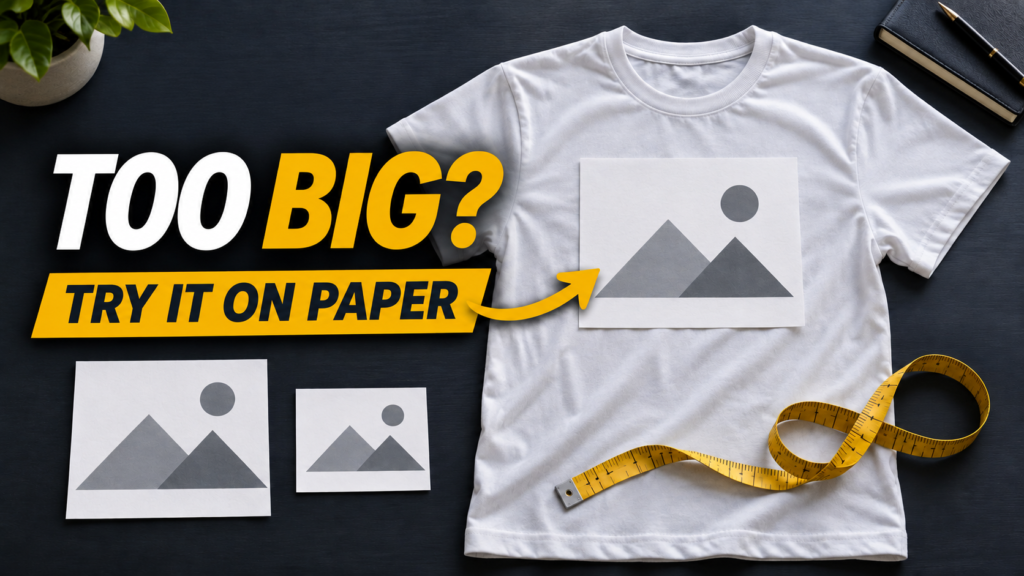
The easiest way to choose a T-shirt print size is to try a paper sample on the actual shirt. A screen preview cannot show everything: the same design can look small on a large shirt and fill most of the chest on a child’s shirt.
1. Choose the shirt and the print position
Lay the shirt flat without stretching the fabric. Decide whether the artwork belongs on the centre chest, one side, the back or a sleeve. Check every garment size you plan to offer.
Look for seams, pockets and places your equipment cannot press evenly. Check the application instructions before placing artwork over those areas.
2. Cut two or three paper samples
Start with rectangles of different widths. They can be blank: you are comparing how much space the design will occupy. Place each one on the shirt and look from a little farther away.
Those numbers explain the calculation. Tall narrow artwork needs a different decision from a wide short design.
3. Check the position
- Find the shirt’s centre.
- Put the paper sample where you want the print.
- Check the visible artwork, not just the edge of the sheet. The file may contain empty space.
- Measure from a reference you can repeat, such as the centre of the neckline.
- Photograph the sample and get the customer’s approval before printing.
The distance below the collar depends on the garment cut and the artwork. Use your supplier’s placement guide as a starting point and confirm on the shirt itself.
4. Set that size in your file
Open a copy of your artwork. Choose centimetres or inches in the width and height boxes. Turn on the link that keeps the shape. Change one measurement and let the program calculate the other.
Do not stretch just one side. Check small letters and details at the final size. If the image looks blurry, find a more detailed file or make the print smaller.
5. Write down what was approved
Save the shirt size, artwork width and height, and print position. Check again for other garment sizes. STAHLS’ placement tips note that adjustments may be needed for different garment sizes.
This paper test is for planning size and position. Follow your transfer, ink, fabric and equipment instructions for actual application. Do not use the paper sample as a transfer.
Free packs to practise with
Quick questions
Should adult and children’s shirts use the same width?
Do not assume so. Compare paper samples on both garments and choose how much space to cover.
Is a bigger print always better?
No. Available space, artwork shape and readable lettering matter more than size alone.
Sources
Keep exploring
Etapas del chisme Mug Designs: 4 Free PNG Files
Free Yellow Flower PNG: 12 Embroidery-Effect Designs
Free Animal DTF T-Shirt Designs: 15 Colorful PNG Files
Free Disney 3D Effect Mug Wraps: 30 PNG Designs
Free Michael Jordan T-Shirt Designs: 13 PNG Files